I have a bug to report, on Windows, if the window becomes too large, it will go outside of the visible area, for example, below the taskbar, and you're unable to move it high enough to see the bottom of the page, and you cannot scale the window vertically.
And a request, if possible, can you make it so you can export the grid, as well as set the colour?
Both issues should be fixed in v0.5. Windows no longer run off-screen - the glyph editor now has scrolling and middle-drag panning, and the main preview scrolls instead of stretching the window. Grid export is also available: check "Include grid in export. Check if it works for you.
Sure, you can do it in 1 minute. Go here: https://www.photopea.com/ upload a transparent bitmap, right-click on the layer -> Blending options -> Stroke
For some reason, specifically lowercase 'r' spacing is off for me in Construct 3 (there is a lot of space after it). Font works correctly if used as ttf with default text object. Am im doing something wrong? Didnt do anything special, just disabled AA, exported the image and copied the settings
This happens because of the \ right before r. In my case, the issue shows up when there’s only a single \, but in your pasted spacing data it looks like you already have two \\.
Just make sure that in Construct 3 it really ends up as two backslash characters before r. If it still behaves like there’s only one (because of escaping), try using four backslashes: \\\\.
So far I only know the issue is caused by the backslash before r in the spacing data, but I don’t know why it doesn’t happen for me. I’ll try generating the spacing data on Windows later - maybe the escaping/serialization differs there.
I've adjusted the alignment of the characters, but they will still align to the top left corner with centering disabled. This seems to be the correct behavior; I've tested it in Construct 3 and don't see it being a problem.
← Return to tool
Comments
Log in with itch.io to leave a comment.
And a request, if possible, can you make it so you can export the grid, as well as set the colour?
Both issues should be fixed in v0.5. Windows no longer run off-screen - the glyph editor now has scrolling and middle-drag panning, and the main preview scrolls instead of stretching the window. Grid export is also available: check "Include grid in export. Check if it works for you.
Hi there!
There is a way to add the Shadow(that I believe that draws an outline) option from the Browser version to the local version?
I remember trying to add a border like this, but it was too difficult. In a browser, it's one line of code, but not in Python.
Its fine! The software already does a lot! I guess I can try the outline with an Image editor! Thanks ^^
Sure, you can do it in 1 minute. Go here: https://www.photopea.com/ upload a transparent bitmap, right-click on the layer -> Blending options -> Stroke
Nice to know that! I would try my way out on gimp, but much faster this way! Thanks!
There are two new options in the new version: outline and shadow.
Very cool tool! Thank you for this.
One feature I’d love to see is JSON export in BMFont format for spacing, kerning and glyphs position data.
It's been a while but I updated the tool and BMFont is now supported.
Rly? Amazing, thank you 🙏🏻
very helpful!
For some reason, specifically lowercase 'r' spacing is off for me in Construct 3 (there is a lot of space after it). Font works correctly if used as ttf with default text object. Am im doing something wrong? Didnt do anything special, just disabled AA, exported the image and copied the settings
Its 18th font from there just in case: https://not-jam.itch.io/not-jam-font-pack
Spacing data i get:
[[8.0, " ()1[]j{}"], [6.0, "!',.:;I`il|"], [12.0, "\"*2357<>EFJSZ^cfsz"], [18.0, "#MWXY"], [14.0, "$%+0689?ABCDGHKNOPQRUVbdeghknopquvy"], [16.0, "&-4=ax~"], [10.0, "/LT\\rt"], [22.0, "@mw"], [20.0, "_"]]
This happens because of the
\right beforer. In my case, the issue shows up when there’s only a single\, but in your pasted spacing data it looks like you already have two \\.Just make sure that in Construct 3 it really ends up as two backslash characters before
r. If it still behaves like there’s only one (because of escaping), try using four backslashes:\\\\.So far I only know the issue is caused by the backslash before
rin the spacing data, but I don’t know why it doesn’t happen for me. I’ll try generating the spacing data on Windows later - maybe the escaping/serialization differs there.Thanks!
Simple glyph editor.
Thanks for feedback. If you have still some issues feel free to leave a comment. I'm not doing native apps daily so this one can have still some bugs.
Oh, the Mac version disappeared ??
I had trouble getting the last build to run on MacOS. Cross-platform support can be difficult. I'll try to restore the MacOS version. :D
Thnaks you ! Drop a line once you do !
I already did it, I wrote it in the second comment.
I restored the macOS versions. I changed the MacOS build tool from PyInstaller to Nuitka, which seems to be a better option.
Spacing data that is not in English is incorrect.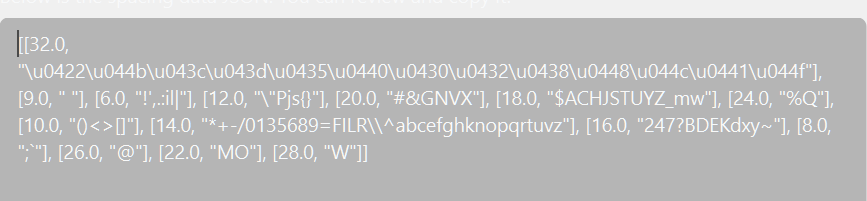
I'll try to fix it this weekend. Thanks for feedback.
The problem has been fixed.
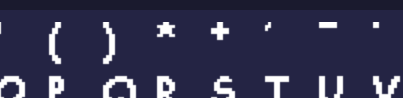
Furthermore, all letters are top-aligned.The web version does not have this problem.

I'll try to fix it this weekend. Thanks for feedback.
I've adjusted the alignment of the characters, but they will still align to the top left corner with centering disabled. This seems to be the correct behavior; I've tested it in Construct 3 and don't see it being a problem.
This is a port of my previous browser-based converter, converted into a native app:
https://stmn.itch.io/font2bitmap
The native version has a few fewer features, but most importantly, it should allow you to disable antialiasing.
I haven't tested this extensively. Let me know if anything isn't working properly.
Hey, I've discovered I can't import fonts.
![]()
It seems that importing fails if the directory or name contains non-English characters.
I'll try to fix it this weekend. Thanks for feedback.
The problem has been fixed. Tested with the following name: żółć_Český_über_日本語_данные_áéí_ß_ł